Quickstart
Run a graph query against a small Parquet dataset, then explore the results in the browser workbench.
On this page
1. Generate the demo data
Install Git, Rust 1.95 or newer, and a C/C++ toolchain. The workbench step also requires Node.js 24. The built-in demo writes three accounts, four transfers, and a graph mapping to a temporary catalog.
git clone --branch v1.1.1 --depth 1 https://github.com/SamuelSupe/graphlake.git
cd graphlake
demo_root=$(mktemp -d)
demo_dir="$demo_root/catalog"
cargo run --locked --example demo -- "$demo_dir"
2. Run a Cypher query
In the same shell, find destinations two transfers away from account 10 in tenant 1. The amount sums the last transfer on each matched path.
cargo run --locked -- --catalog "$demo_dir/graph.yaml" query \
  'MATCH (a:Account)-[:Transfer]->(b:Account)-[t:Transfer]->(c:Account)
WHERE a.tenant_id = 1 AND a.account_id = 10
RETURN c.account_id AS account, count(*) AS paths, sum(t.amount) AS amount'
Expected result Account 30, 2 paths, total amount 600.
3. Open the workbench
Build the browser UI, set the local admin password, and start the service. The catalog's valid model is adopted on startup.
npm --prefix web ci
npm --prefix web run build
cargo run --locked --features admin --bin graphlake-admin -- \
  --catalog-dir "$demo_dir" auth init
cargo run --locked --features admin --bin graphlake-admin -- \
  --catalog-dir "$demo_dir" --assets-dir web/dist
Open http://127.0.0.1:7337 and sign in as admin. In Graph Models (图模型), open graph and go to Query (查询).
4. Explore the transfers
Choose Cypher, run the query below, then open the Graph (图) result tab. Select a node or relationship to inspect its properties.
MATCH p = (:Account)-[:Transfer]->(:Account)
RETURN p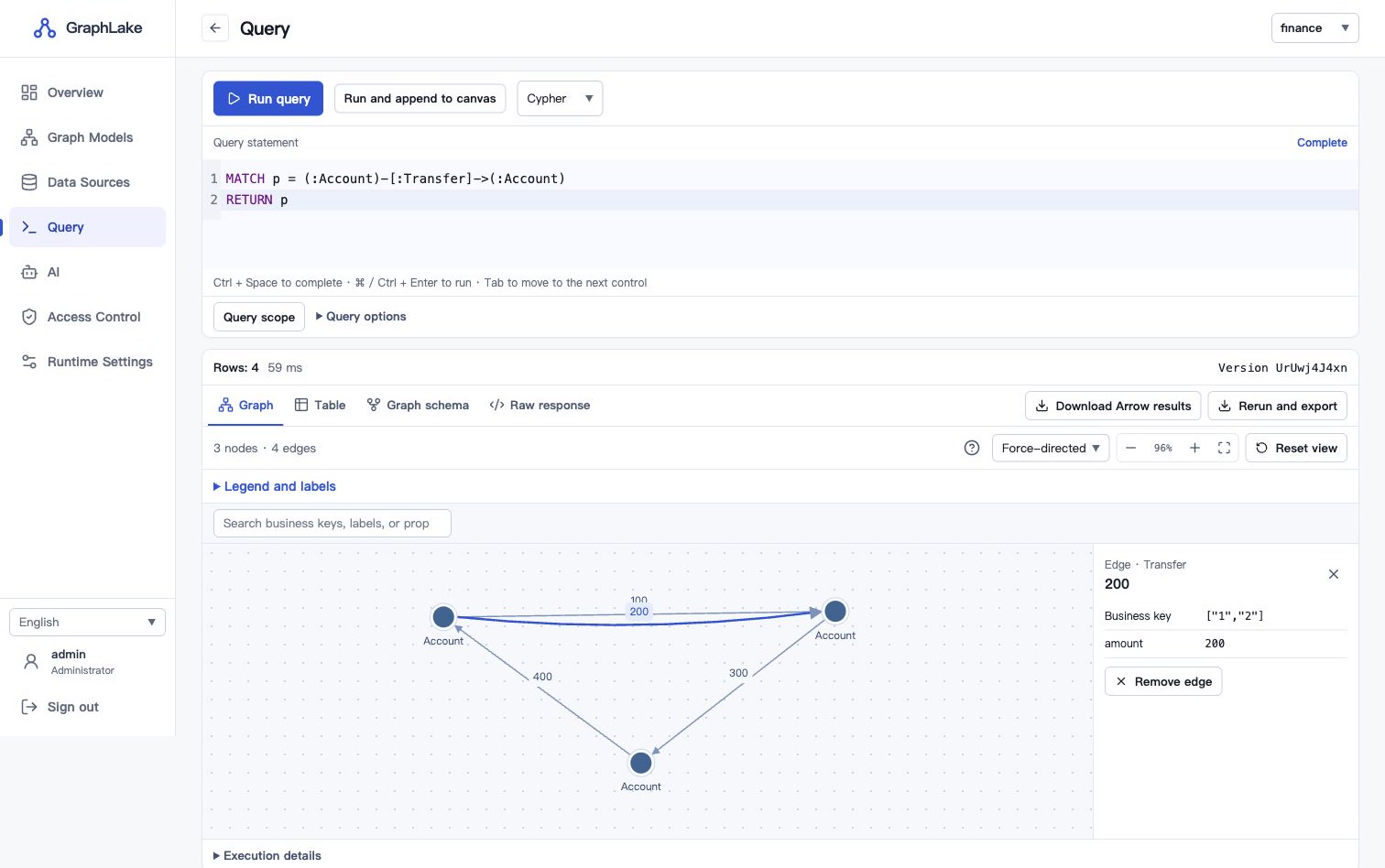
Ready for your own data? Connect a source and publish a graph model.